Table of Contents
Overview
The QA Supervisor View enables QA supervisors to review disputes submitted by agents and supervisors. It allows the QA supervisor to finalize the dispute resolution by selecting an appropriate Dispute Status (e.g., QA Supervisor Accept or QA Supervisor Decline) and providing evaluator comments in the designated field. The system automatically populates the Electronic Signature Name and Date fields to ensure record authenticity.
Review Dispute
Following displayed is the Review/Dispute Information category for QA supervisors:
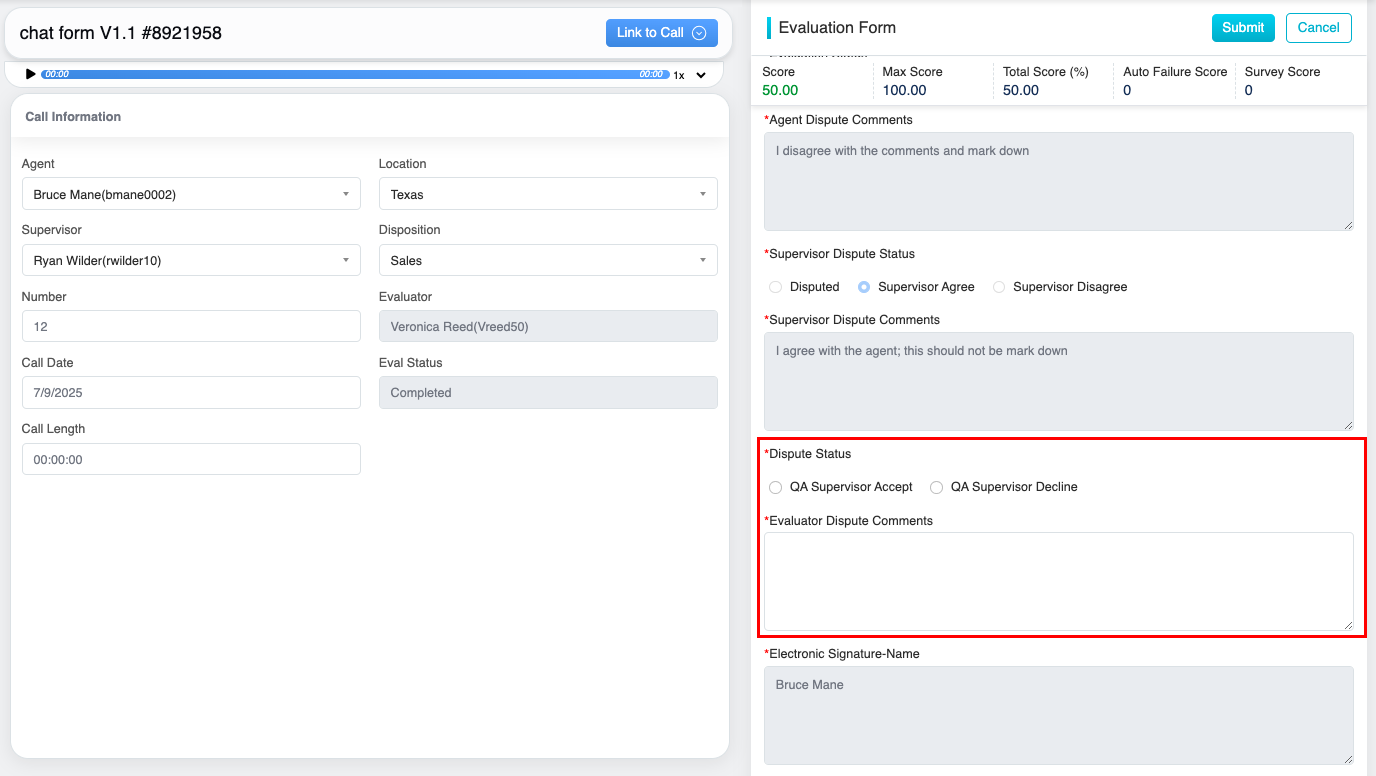
Dispute Status
Submit Dispute Verdict
After reviewing the Agent’s and Supervisor’s submitted dispute comments,
- Choose the appropriate Dispute Status from the available options: QA Supervisor Accept, or QA Supervisor Decline.
- Provide the relevant Evaluator Dispute Comments in the designated comment box.
Electronic Signature
- Electronic Signature – Name – Automatically populated with the logged-in user’s name when the dispute is submitted. The field is system-generated, read-only, and cannot be edited.
- Electronic Signature – Date – Automatically populated with the current system date when the dispute is submitted. The field is system-generated, read-only, and cannot be edited.
Note: When a Proxy User reviews or submits a dispute on behalf of an User, the logged-in Proxy User’s name is displayed in the Electronic Signature – Name field.
Once reviewed and the required fields are updated, click Submit to submit the QA supervisor’s final verdict.
Video